

Check out our FAQs for answers to your questions and learn how to get the most out of Universal Music for Creators.
Can’t find what you’re looking for? Visit our Contact Us page and send us a message.
LICENSING & PLANS
There are two Universal Music for Creators subscription plans available: Creator and Creator Pro.
The Creator plan is for personal use and for content creators, influencers, vloggers, or gaming streamers who produce content to share with your family and friends. This plan includes unlimited access to our the Universal Music for Creators catalog. You can also whitelist a set of personal channels on each of the following platforms: YouTube, Facebook, Instagram, Twitch, TikTok, and a personal podcast on any podcasting platform.
The Creator Pro plan is a commercial offering designed for individuals who create content for companies, brands, or third parties for use on all online platforms and digital ads. If you are a freelancer, self-employed, or a small business, our Commercial plan is the ideal option for you. With this subscription, you can clear and monetize up to five sets of channels on each of the following platforms: YouTube, Facebook, Instagram, Twitch, TikTok, and a personal podcast on any podcasting platform.
The Creator Pro plan is designed for freelancers and small businesses and is for online use only. If your company has an annual turnover of more than USD 5 million or if you require coverage for cinema, TV, or broadcast, please contact Universal Production Music.
The Creator plan allows non-commercial subscribers to publish and monetize videos using Universal Music for Creators' library of music on platforms such as YouTube, Facebook, Instagram, TikTok, Twitch, and podcasting platforms. This plan is for personal use only, and you can safelist one personal channel per social platform and one podcast.
The Creator Pro plan is perfect for freelancers and small—to medium-sized businesses creating content for commercial use or ads, either for themselves or their clients. It gives you unlimited access to a full catalog of music, allowing you to create content across platforms such as YouTube, Instagram, Facebook, TikTok, Twitch, and podcasts. You can monetize up to five channels per platform and create digital ads or boosted social posts.
You will continue to have access to music until your subscription is cancelled at the end of your current billing cycle. Any content that you publish until cancellation remains claim-free, subject to our Terms of Use. Any content you publish during your active subscription will remain cleared to monetize forever. Using our music after your subscription ends in any new content will be subject to claims. You can reactivate your subscription at any time to continue using our music claim-free.
Music and sound effects used by subscribers will be free from any claims, as our music is copyright-protected. Copyrights are an important mechanism in the music industry that allows us to best protect our writers' work from unlicensed use.
You’ll need the right license to legally play music on your own streaming channels, such as Twitch, YouTube, or Facebook. Getting a license means contacting rights holders and paying for permission, which can be time-consuming and pricey.
With Universal Music for Creators, the process is much easier. Your subscription works as your license, giving you instant access to thousands of tracks and sound effects that are already cleared for streaming. Just pick the music you like, go live, and focus on your content.
Universal Music for Creators is a music licensing platform made for anyone who wants to add music to their content without worrying about copyright. That could be a YouTuber or Twitch streamer, a TikTok creator, a podcaster, a freelancer making videos for clients, or even a small business producing social content and ads.
To keep things simple, there are two subscription options depending on how you create. The Creator plan is great if you’re making content for yourself. The Creator Pro plan is designed for freelancers and small businesses who need music for client projects or branded content.
LEGAL & PRIVACY POLICY
Yes. Whether you’re an individual creator, a freelancer working with clients, or a small business making promotional content, you legally need the right license to use music you didn’t create yourself. Without proper licensing, platforms like YouTube, TikTok, and Twitch can issue copyright claims, mute your audio, or even remove your content. For businesses, unlicensed use can also create legal and reputational risks.
A license gives you clear permission from the rights holders, so you can publish and monetize with confidence. With Universal Music for Creators, your subscription provides a straightforward, legal way to access thousands of tracks and sound effects that are fully cleared for personal projects, client work, and business content.
MANAGE MY MUSIC
MY ACCOUNT
SITE & TOOLS
GUIDE TO CLAIMS-FREE MUSIC
Claims-free music refers to music that, once licensed, does not require any additional royalties to be paid by the licensee. Any content published within the terms of the license will not receive copyright claims.
YouTube’s Content ID system automatically scans uploaded videos for copyrighted material. If copyrighted music is detected, a Content ID claim is placed on the video, allowing copyright owners to manage their content. They may choose to:
● Monetize the video by adding ads.
● Mute the video or block it.
A Content ID claim only acknowledges the presence of copyrighted music but doesn't necessarily mean a video can’t be published.
For Universal Music for Creators subscribers: Content published during an active subscription will be free from copyright claims.
The safest way to avoid copyright claims is to only use properly licensed music in your content. Platforms like YouTube, TikTok, and Twitch automatically scan uploads using Content ID, so even a few seconds of unlicensed music can trigger a claim or strike. In order to avoid this, purchase any Universal Music for Creators subscription and you link your channel or video to your subscription license. You can do this once you purchase a subscription on the confirmation page or add this in on the ‘Content ID’ section in your website account.
If you have an active subscription but receive a claim, please check that the channel ID you have entered is correct. If everything looks right, then please get in touch through our website contact form detailing your email address, channel ID and Video ID.
Safelisting, also known as clearing or allow listing, involves linking your channels or videos to your Universal Music for Creators account to signal to platforms that you are licensed to use their music. This helps prevent copyright claims when posting content. To avoid issues, it's crucial to safelist your content before publishing, and you must have an active subscription or license at the time of posting. Content published during an active subscription remains cleared, but once a subscription expires, new content cannot be posted with our music. If you encounter a copyright claim, follow the guide to dispute it.
To avoid claims:
● Safelist your YouTube channel or video under your Universal Music for Creators subscription by adding your channel ID in the "Content ID" section of your account.
This should look something along the lines of:
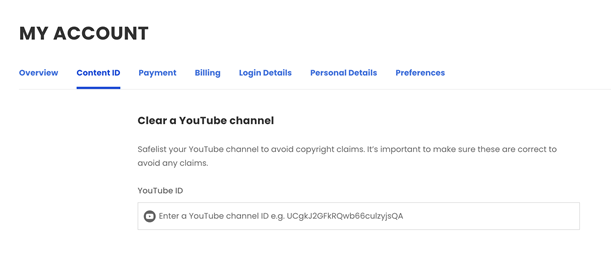
● Ensure your channel is properly linked during your subscription before publishing any content.
If you receive a claim:
● Verify the accuracy of your channel ID.
● If correct and still receiving a claim, contact our customer support via contact us with the following information:
○ Email address associated with your Universal Music for Creators account.
○ Channel ID.
○ Video URL and claim notification screenshots.
In some cases, third-party claims may mistakenly flag your video. Since Universal Music for Creators holds the rights to its music, these claims shouldn’t occur. However, the decision to remove the claim rests with the platform and the claimant. If you receive a copyright claim from a third party despite having the rights to the music, you can request its removal by submitting a dispute.
When disputing the claim, make sure to provide your email address in the dispute note.
Additionally, please fill out the form on our contact us page, including the URL of the affected video and the email address associated with your Universal Music for Creators account.
Steps to dispute:
● Log into your YouTube account and go to YouTube Studio.
● Locate the copyright claim and select "See Details."
● Click "Select Action" to dispute.
● In the dispute note, include:
○ Your Universal Music for Creators account email.
○ Subscription / license details and any relevant information.
Dispute the claim within 5 days to avoid losing revenue. YouTube will review the claim and release it if it was issued incorrectly. Disputing a claim is the best way to ensure there is no loss of revenue or impact on video monetization.
Make sure that your content is properly licensed on YouTube by linking your channel with your Universal Music for Creators subscription. This will ensure that all videos released during your subscription will be approved for monetization indefinitely, even if you cancel your subscription. However, if you publish videos with Universal Music after your subscription ends, it may lead to copyright claims and loss of monetization. Remember, timing of video publication is crucial, not the downloading of tracks.
If you have a personal or commercial subscription, you can easily link your channel to your subscription in your account.
Monetization claims on long-form videos are not the same as claims on YouTube shorts.
YouTube’s Shorts Policy allows matching tracks to be linked to your video to increase discoverability and visibility. This means if YouTube finds a track in your shorts that is from Universal Music for Creators catalog and you have a valid subscription for that song, then the policy will increase the visibility of your YouTube Short. The discoverability or market share of the video in terms of ad revenue is unaffected by the content ID match found in it. Considering this, there is no reason to refute a claim made by Shorts.
With a Universal Music for Creators subscription, we aim to provide you with music that enhances your video or podcast content. You can edit, cut, and loop our tracks to get the perfect audio fit. Additionally, you can use our stems feature to manipulate, isolate, and loop certain sounds within the track to enhance it further.
However, creating edited, covered, or remixed versions of our music for distribution or making them available on platforms such as Apple Music, Spotify, and Soundcloud is not allowed.
Our licenses also do not cover uploading content with our music for creating a music listening experience. A music listening experience includes:
- Stand-alone content, such as uploading all or part of a track against still or minimal visuals
- Lyric videos
- Music compilations or music playlists
- Online radio stations
If our music is used in any of these ways, we reserve the right to suspend your Universal Music for Creators account.
Yes. If you didn’t make the music yourself, you’ll need permission to use it in your content. That permission usually comes in the form of a license from the rights holder. Without it, platforms like YouTube, TikTok, and Twitch can flag your videos, mute the audio, or can even take your content down. For freelancers and small businesses, unlicensed use can also create bigger legal and reputational risks.
With Universal Music for Creators, you don’t need to worry about chasing down permissions. Your subscription gives you instant access to a huge library of tracks and sound effects that are already licensed for creator use.
Yes, but it's not always simple. Instagram does have its own music library, but the tracks there come with limits, especially if you’re running a business account or want to monetize your posts. Use the wrong song and your video could end up muted, blocked, or taken down altogether.
With Universal Music for Creators, you don’t have to second-guess it. Your subscription gives you access to thousands of tracks and sound effects that are already cleared for Instagram, so you can post Reels, Stories, or branded content without worrying about copyright claims. It’s simple, safe, and lets you focus on creating instead of stressing about music rights.
The easiest way to keep your Reels safe from copyright is to use music that’s already licensed for creators. Instagram’s own music library can work for some posts, but it’s limited and using songs you don’t have permission for could mean your audio gets muted or your Reel gets blocked.
With Universal Music for Creators, you don’t have to worry about that. Your subscription gives you thousands of tracks and sound effects that are already cleared for Instagram. Just pick a track you like, add it to your Reel, and post with confidence knowing copyright won’t get in the way of your content.
Yes, but if you don’t have the proper license, platforms like Instagram, TikTok, YouTube, or Twitch can pick it up straight away and hit you with copyright claims.
The easy way around it is to use music that’s already cleared for social media. With Universal Music for Creators, your subscription gives you thousands of tracks and sound effects you can safely add to your posts, Reels, or streams. So you get the soundtrack you want, without the stress of copyright getting in the way.
Yes, but it has to be music you’re actually allowed to use. Twitch is strict about copyright, so if you play tracks you don’t have the rights for, parts of your stream could be muted or even removed. That’s why most streamers stick to music that’s been properly licensed for the platform.
Universal Music for Creators makes that easy. A subscription gives you ready-to-use tracks and sound effects that are cleared for Twitch, so you can keep your streams sounding great without risking copyright trouble.
Claims-free means your content won’t be hit with copyright claims when you use our music. There is no muted audio, blocked videos, or sudden demonetisation; just stress-free publishing across platforms like YouTube, TikTok, and Twitch.
Here's how it works: when you buy a subscription, that license covers you to use our tracks within the terms of the plan. Anything you publish while your license is active will stay claims-free. And don’t worry, our artists and songwriters still get their royalties; you just don’t have to think about it. You pay for the subscription, and we take care of the rest.
Once you’ve got a Universal Music for Creators subscription, you’ll need to link your channel or video to your license so platforms like YouTube know you’re covered. You can do this right after purchase on the confirmation page, or later in the Content ID section of your account.
If you’ve set it up but still get a claim, double-check that your channel ID details are correct. And if everything looks right, just reach out to us through the contact form with your email, channel ID, and video ID.